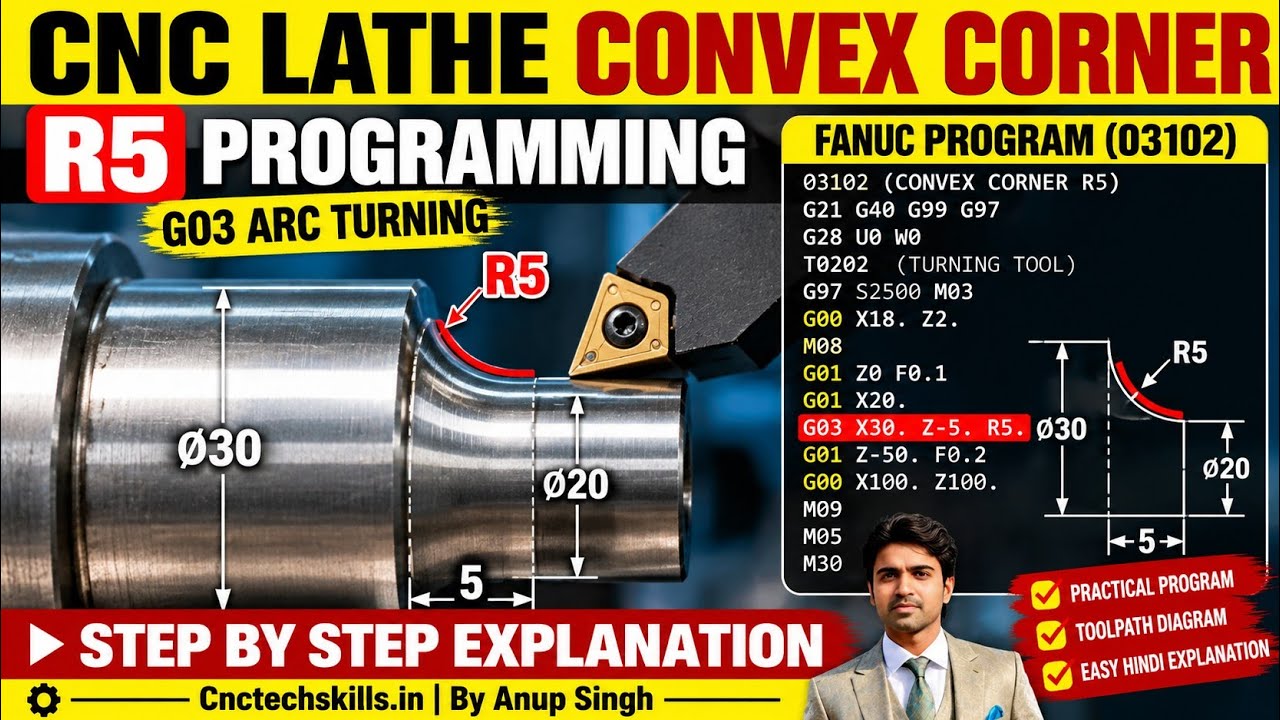
Master FANUC G03 Arc Turning: Programming an R5 Convex Corner on Your CNC System
This article provides an in-depth exploration of CNC system, covering foundational concepts, practical applications, and engineering insights.
Modern manufacturing relies heavily on precise metal cutting, and mastering arc interpolation on your CNC system is a fundamental skill for any machinist. Creating smooth, rounded edges—such as an R5 (5mm radius) convex corner—is a standard operation in lathe programming. By using the FANUC G03 command, you can easily turn counter-clockwise arcs with ultimate accuracy.
What is G03 Arc Interpolation?
In G-code programming, G02 and G03 are used for circular motion. While G02 commands a clockwise arc, G03 generates a counter-clockwise arc. When machining an outer diameter (OD) convex corner on a standard lathe setup, moving from the facing surface into the main diameter requires a counter-clockwise motion.
When working with a FANUC CNC system, standard G-code commands allow you to create smooth, accurate curves with minimal programming effort.
Step-by-Step R5 Convex Corner Programming
To program a 5mm convex radius on an outer corner, you need to calculate the precise starting and ending coordinates based on your workpiece dimensions.
Here is the general sequence for programming an R5 arc:
1. Position the Tool (Start Point): Feed the cutting tool to the coordinate point where the radius begins on the face of the part.
2. Execute the G03 Command: Call G03 and specify the end point coordinates in both X (diameter) and Z (length) axes, followed by the radius value R5.0.
3. Continue Linear Cutting: Transition back to linear movement (G01) to continue turning along the shaft length.
Example Code Structure:
G01 X20.0 Z0.0 F0.15 ; Move to start of radius
G03 X30.0 Z-5.0 R5.0 ; Turn R5 convex arc (counter-clockwise)
G01 Z-25.0          ; Continue straight turning
Note: Because lathe X-coordinates represent diameter, an R5 arc increases the X coordinate by 10mm overall (5mm on each side).
Best Practices for FANUC Arc Turning
To achieve an optimal surface finish and strict dimensional tolerances, keep these practical tips in mind:
* Tool Nose Radius Compensation: Remember to use tool radius compensation (G42 for standard right-hand OD turning) to offset tool geometry errors on curved profiles.
* Feed Rate Control: Use an appropriate feed rate during arc interpolation to prevent tool chatter and maintain smooth contours.
* Dry Run & Simulation: Always verify your G-code program using the graphical simulation feature on your CNC system controller before executing the cut on live material.
By mastering G03 arc turning for convex profiles, you can enhance part aesthetics, reduce stress concentration points on turned components, and maximize your machine's productivity.


