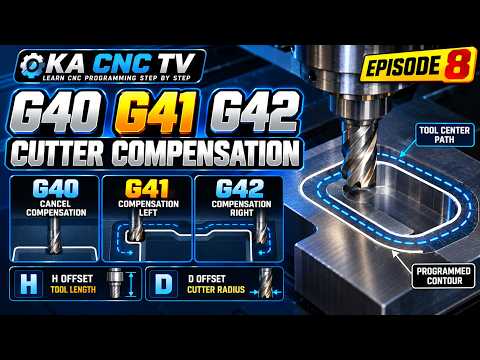
When programming a CNC machine, achieving exact dimensions on your finished workpiece requires a solid understanding of tool geometry. Cutting tools aren't zero-width points; they have physical radii that affect the cutting path. That is where cutter radius compensation comes into play. Whether you are a beginner programmer or a seasoned machinist referencing your daily CNC manual, mastering G-code commands like G40, G41, and G42 is essential for precise milling operations.
What is Cutter Radius Compensation?
In CNC milling, the tool's center point follows the programmed path by default. However, because cutting tools have a specific radius, the edge of the finished part will be incorrect if you do not account for tool size. Cutter radius compensation automatically shifts the tool center away from the programmed path by the tool's radius. This ensures the edge of the cutter follows the exact contours of your design without requiring manual math for every move.
Decoding the G-Codes: G40, G41, and G42
To implement tool radius offsets correctly, every standard CNC manual defines three primary G-codes:
- G41 (Cutter Compensation Left): This code shifts the tool to the left side of the programmed path relative to the direction of tool travel. It is most commonly used for climb milling standard outer contours and inner pockets.
- G42 (Cutter Compensation Right): This code shifts the tool to the right side of the programmed path relative to the direction of movement. It is typically used during conventional milling operations.
- G40 (Cutter Compensation Cancel): Safety is critical in G-code programming. G40 turns off active tool radius compensation, returning the machine control to tool-center-line positioning. Always include G40 at the end of a compensated feature to prevent unexpected tool shifts in subsequent moves.
Why Cutter Radius Compensation Matters
Utilizing cutter compensation provides significant practical advantages in the machine shop:
- Tool Wear Compensation: When a tool wears down slightly, you can simply adjust the offset register at the machine control rather than recalculating the G-code program.
- Simplified Manual Programming: You can program part geometry directly from blueprint dimensions, saving setup time and preventing math errors.
- Tool Flexibility: You can easily swap tool sizes (for example, switching from a 1/2" end mill to a 3/8" end mill) without re-posting your program.
Final Thoughts
Understanding how to use G40, G41, and G42 will dramatically improve your machining accuracy. Next time you consult your CNC manual, ensure you review proper lead-in and lead-out moves, as compensation requires a linear movement to activate safely. Master these fundamentals today to produce higher-quality parts on every machine run!


