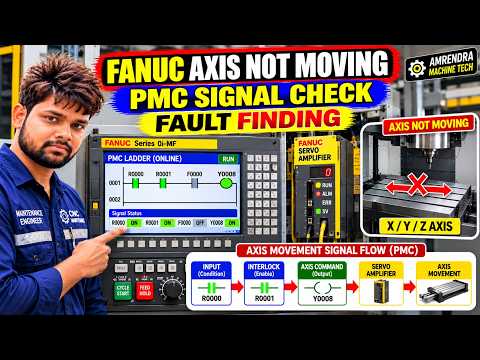
Are you facing an issue where your FANUC CNC machine axis refuses to move? It can be frustrating when your machine appears fully operational, yet the X, Y, or Z axis remains completely stationary. Before calling in a service technician, you can easily trace and fix this fault yourself by checking the PMC (Programmable Machine Controller) signals.
While basic operating procedures are outlined in your standard CNC manual, pinpointing motion blockages requires navigating the PMC diagnostic screens built into your FANUC control panel.
Why Is Your FANUC CNC Axis Stuck?
When a CNC axis fails to move in either manual (JOG/MPG) or automatic mode, the control system is almost always waiting for an interlock or safety signal to clear. Common causes include:
- Axis Interlock Signals: Active hardware or software interlocks blocking motion commands.
- Overtravel Limit Switches: Tripped physical limit switches preventing axis movement.
- Feed Hold or Emergency Stop Circuits: Active hold signals or tripped safety relays.
- Door Guard Interlocks: Open safety doors preventing machine execution.
Step-by-Step Fault Finding via PMC Signals
The PMC acts as the communication bridge between the machine hardware and the FANUC controller. By inspecting these signals, you can instantly see which safety or operational check is failing.
- Access the PMC Diagnostic Screen: Press the
SYSTEMhard key on your FANUC control panel. Navigate to thePMCsoftkey, then selectPMCMNT(PMC Maintenance) orSTATUS. - Search for Signal Addresses: Locate the specific signal bit addresses corresponding to axis interlocks (such as G-signals for control functions and F-signals for status outputs). You can find the exact signal addresses detailed in your machine's electrical documentation or CNC manual.
- Verify Signal States: Observe the live bit status (0 or 1). For instance, if an axis interlock bit reads
0instead of1, the system is blocking motion. Trace that bit back to the physical input (like a broken wire, dirty switch, or open door switch).
Master Machine Diagnostics
Troubleshooting an immobile axis does not have to rely on guesswork. By monitoring PMC diagnostic bits and cross-referencing them with your official CNC manual, you can quickly resolve axis lockouts, reduce machine downtime, and restore productivity on your shop floor.


