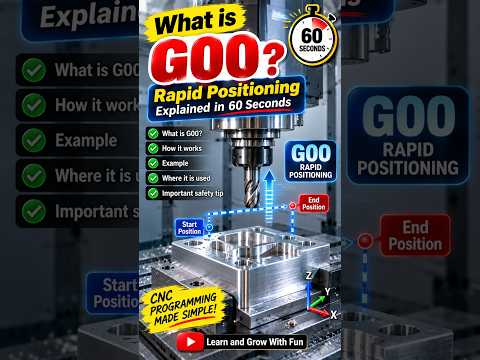
If you are just beginning your journey into CNC education, navigating the world of G-codes can feel overwhelming. However, mastering the core fundamentals is the fastest way to gain confidence on the shop floor. One of the very first commands every machinist encounters is the G00 code, famously known as Rapid Positioning.
In this quick guide, we will break down what the G00 code means, how it functions in CNC programming, and why understanding its motion is crucial for safe machine operation.
What is the G00 Code in CNC?
In CNC (Computer Numerical Control) programming, G00 is a non-cutting preparatory command used to move the machine tool from its current position to a specified coordinate at maximum speed.
Unlike cutting commands (such as G01 for linear interpolation or G02/G03 for circular cuts), G00 is designed exclusively for positioning the tool when it is not engaged with the material. Because the tool is traveling through air, the machine executes this movement at its maximum rapid traverse rate—hence the name "Rapid Positioning."
How G00 Works in Practice
When a CNC controller reads a line of code containing G00 (for example, G00 X50.0 Y25.0 Z10.0), it commands the specified axes to move simultaneously toward those target coordinates as fast as the machine allows.
Key characteristics of G00 include: - Maximum Machine Speed: Motion occurs at the machine tool's factory-preset rapid feed rate. - Dog-Leg Motion: Depending on your machine controller, axes may move at their own maximum speeds independently. This often results in a "dog-leg" trajectory rather than a perfectly straight vector. - Zero Cutting Action: G00 should never be used while the cutting tool is in contact with the stock material.
Safety First: Avoiding Rapid Collisions
Because G00 drives the spindle and axes at full speed, any programming oversight can lead to a severe machine collision. A fundamental pillar of practical CNC education is learning how to manage rapid moves safely.
To prevent expensive crashes when using G00: 1. Retract to Clearance Height: Always retract the Z-axis to a safe height before initiating rapid movements across the X and Y axes. 2. Use Rapid Override: When proving out a new program, dial down the rapid override switch on the machine control panel to 25% or 50%. 3. Account for Fixtures: Always double-check your motion path to ensure the tool clears all clamps, vises, and raw stock.
Conclusion
Mastering the G00 rapid positioning code is a simple yet vital step in setting up successful machining operations. A strong foundation in CNC education empowers you to write efficient code while keeping your workspace safe. Keep practicing your G-code fundamentals, and you will be programming like a pro in no time!


